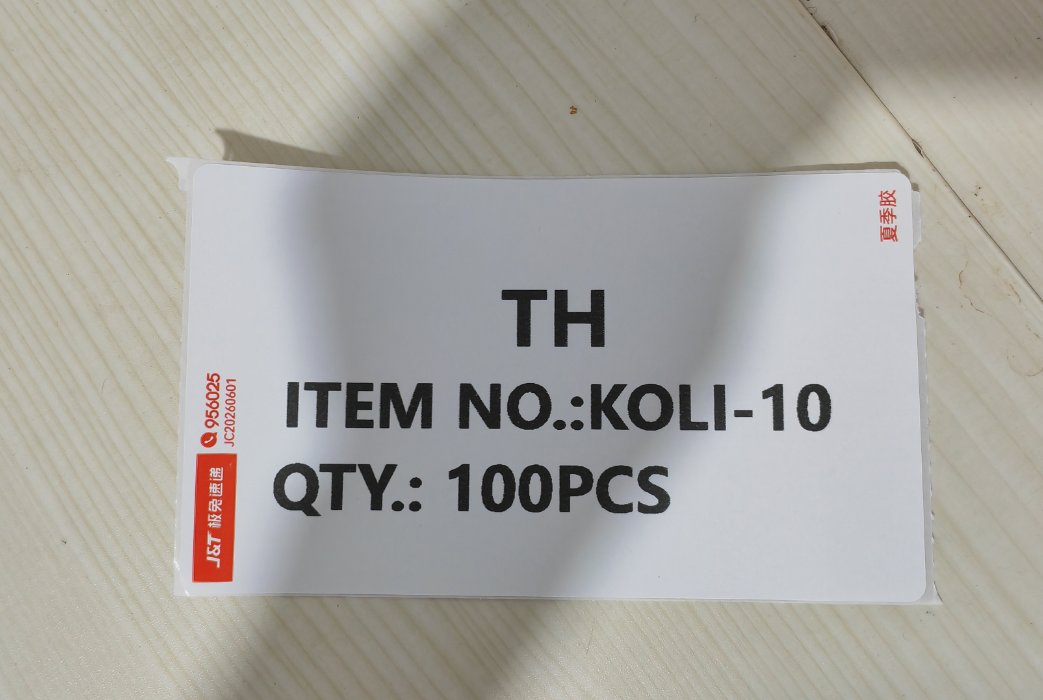
Here's a small problem that used to waste a surprising amount of time: carton marks and small labels.
Every order needs them. A carton mark (箱唛) goes on the shipping carton — customer code, item number, quantity. Small labels go on bags, polybags, sample batches. The amounts are usually tiny: ten labels here, thirty there. But we still had to send the file to a print shop, wait for it, walk over, pay about 1 RMB per sheet, and — this is the real killer — if we spotted a typo or the quantity changed at the last minute, we did the whole trip again.
Not expensive. Just annoying. And it adds up, dozens of times a month.
The Tool We Already Owned
One day it hit us: sitting next to the packing table was a thermal express waybill printer — the kind every e-commerce seller in China uses to print shipping labels for J&T, SF Express, YTO and so on. It prints on cheap roll label paper (a few cents per label), it needs no ink, and it's fast.
We were using it to print courier waybills. But a blank label paper doesn't care what gets printed on it. A carton mark is just text in boxes. So why not print our carton marks and small labels on it too?
Building the Tool with WorkBuddy — in Plain Language
By now, this blog's readers know our pattern: we don't write code, we describe the problem to AI and let it build the tool. This time we used WorkBuddy, our AI assistant that lives on the factory computer and can actually create and edit files.
The whole conversation was in plain Chinese. Roughly, it went like this:
"I have a thermal express label printer. Make me a web tool where I can type in carton mark content — customer code, item number, quantity, remarks — preview it on a label of the exact paper size, and print it straight to the label printer. Save my templates so next time I just change the number and hit print."
WorkBuddy generated a single HTML file, we tested one print, told it what to adjust — font sizes, bold weight so the barcode scanner can't miss it, the label width and height to match our roll paper — and it refined the template in minutes. No developer, no software install, nothing to pay for.
What the final tool does:
- Editable fields — destination code, item number, quantity, batch, whatever the order needs. Type, preview, print.
- Saved templates — the layouts we reuse daily are one click away. Today's batch is literally: open, change "QTY" from 100 to 200, print.
- Exact label size — the preview matches the physical label paper, so nothing gets cut off at the edges.
- Any quantity, any time — one label or fifty, it costs the same: pennies. At 11pm before a pickup, we print. No closing hours.
The Real Win Isn't the Money
Let's be honest: we're not saving a fortune. A few sheets a week at 1 RMB each — the label paper savings barely buy a coffee. But that was never the point.
The point is that printing a label is now zero-effort. No trip, no waiting, no minimum order, no "sorry we're closed". An order change at 10pm takes 30 seconds. For a small factory where the boss is also the packer, the shipper and the customer-service rep, removing dozens of tiny errands like this is what makes one person able to run the whole thing.
This is also, quietly, a mindset shift: we stopped seeing our equipment as single-purpose. The "express waybill printer" became just "the label printer". Same hardware, three times the usefulness — after one conversation with AI.
Want to Build One Yourself?
If you run a small workshop, warehouse or e-commerce operation and have a thermal label printer, you can build the same tool. Our recipe:
- Find your biggest label-related annoyance — carton marks, shelf tags, sample swatches, price stickers. Pick the one you outsource most often.
- Describe it to an AI assistant in the most boring, concrete way possible: what fields you type, what the label should look like, what paper size your printer uses (e.g. 100×150 mm), that you want templates saved.
- Print one test label and give feedback — "the text is too small", "shift everything 2mm left", "make the item number huge". AI tools iterate fast; two or three rounds is usually enough.
- Save your templates and never think about it again.
Total cost: your time for one afternoon chat, which we spent while the printer was warming up anyway.
This is Post 14 of our AI journey — a tiny tool, but it's exactly how a 21-year-old garment factory modernizes itself: one annoyance at a time. If you need custom bags, apparel, or pet wear from a factory that solves its own problems with AI (and yours too), come say hello on our contact page.